
EMBODIED DATA × HARDWARE / CAPTURE TO FIELD
How Embodied Data and Hardware Drive Each Other: Capture Device Selection, Playback, and Field Reliability
The quality of embodied AI data is largely determined by the capture equipment and field conditions, with annotation and training coming only after that. This article breaks down, across equipment selection, playback and visualization, time synchronization and calibration, the training iteration cadence, deployment feedback, and reliability and field implementation, how data and hardware drive each other—which steps are most prone to rework, which metrics belong in an acceptance checklist—and offers a view of what to expect over the next two years.
The common mistake in embodied data projects is treating equipment and data as two separate things: devices bought against a parameter sheet, data delivered by volume, with a single phrase—'align on requirements'—bridging the gap between them. In practice, almost every problem lives in that seam: you only discover after selecting the device that the wearing method blocks the line of sight; only after capturing the data that the timestamps don't match; only after training the model that failure cases cluster in a particular type of scenario. This article follows the real order in which a project moves forward, stringing selection, playback, calibration, iteration, deployment feedback, reliability, and field implementation into one inspectable chain, and offers criteria that can be turned directly into a checklist.
1. Why Equipment and Data Must Be Designed Together
Capture devices set the ceiling for a batch of data, a point that is often overlooked when planning a project. Narrow the field of view and hand movements fall at the edge of the frame; without hard synchronization across multiple cameras, the action and its outcome won't line up on the timeline; without protective housings, dust or light rain forces a shutdown. These flaws are invisible during procurement and only surface once the data reaches the training team, by which time the cost of rework has multiplied several times over.
Conversely, data-side requirements can push back on equipment changes. If playback reveals that fingertips are persistently occluded, a wrist view has to be added; if spot checks show that backlit scenes are all washed out, the exposure strategy has to be adjusted or a lens hood added; if failure analysis shows the first frame of an action is always missing, a pre-trigger buffer has to be built into the recorder. None of these can be solved by a purchase order—only by both teams sitting down and changing things together.
A more realistic situation is that the equipment team and the data team often belong to different companies, with the scenario owner in between. Each of the three has its own acceptance criteria: the equipment side looks at specifications and shipment volumes, the data side at the number of clips and annotation volume, and the scenario side at whether workers are willing to wear the device and whether it gets in the way of their work. When the three sets of criteria don't line up, the project keeps getting pulled back and forth at handoffs. Agreeing on a common set of criteria first is worth more than buying ten more devices.
One actionable yardstick: can a round trip from a problem found in the field to a change in the device design be completed within two weeks? If it can, the interface works; if it can't, problems are still traveling by email and meetings, and every subsequent iteration will be slower.
2. Capture Device Selection: Define the Scenario First, Then the Parameters
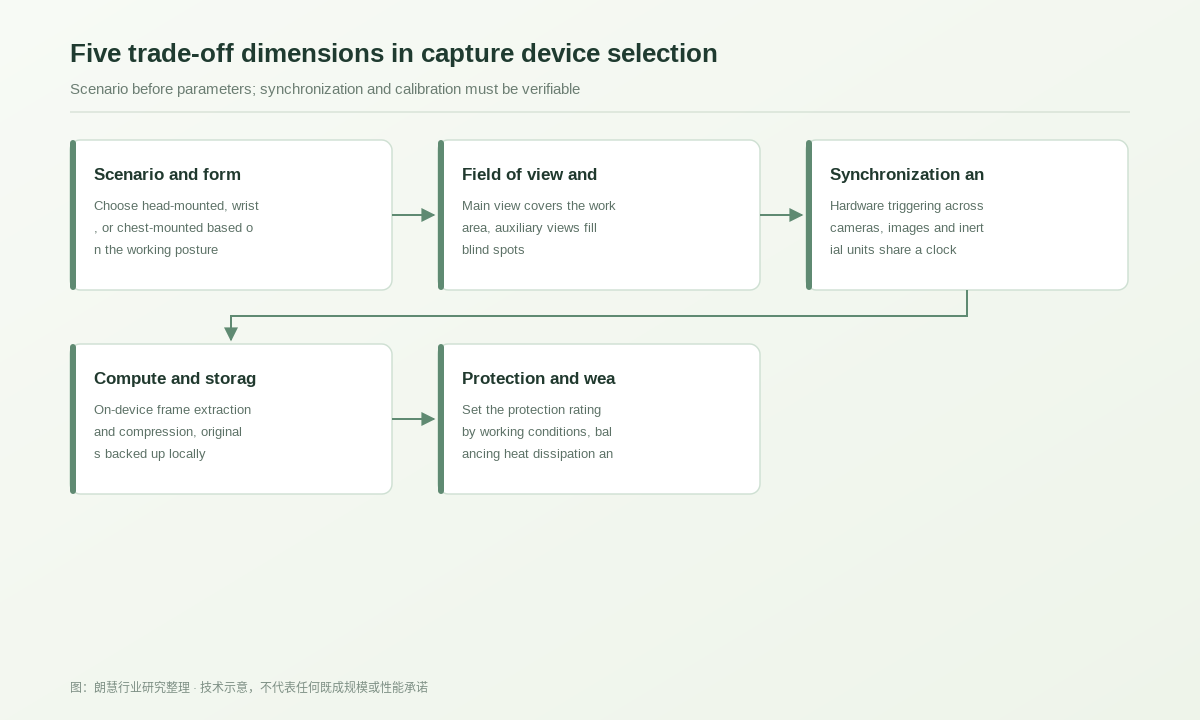
Selection should not start with a spec sheet but with the scenario. An assembly station in a factory has overhead beams, lighting, and safety gear, so a head-mounted device has to contend with mount height and blocked sightlines; roof work involves wind, dust, and rain, so the protection rating and mounting method outweigh resolution; in service settings, movements are small, so a wrist or chest view looks more natural than a head-mounted one. The scenario determines the form factor, the form factor determines the parameters, and reversing that order makes it easy to buy the wrong device.
Field of view and distortion are a pair of metrics that must be looked at together. Too narrow a field of view crops the hand workspace; switching to a fisheye for full coverage stretches the edges, distorting spatial localization so the model learns distortion rather than movement. Over the past two years, overseas data demands have commonly required eye-level, distortion-controlled footage—a trend worth factoring in at the selection stage. A pragmatic compromise is to cover the work area with an eye-level main camera and add one or two auxiliary views to fill blind spots.
Synchronization methods are often written into spec sheets but never verified. Multi-camera setups that rely on hardware triggering, with images and inertial units sharing a time base, are the reliable approach; aligning on software timestamps looks fine in short recordings, but drift accumulates over long captures, and during playback the motion and force feedback no longer line up. At selection, ask the supplier for raw data from one long continuous recording and plot a curve of timestamp differences yourself—that is far more informative than a spec sheet.
Compute, storage, and battery life form another set of trade-offs. On-device frame extraction and compression can significantly reduce storage pressure, but they consume compute and raise heat; long recordings at full resolution look good yet tend to drop frames once the memory card fills up. A reasonably safe combination is to keep a compressed, playable version on-device, retain an original backup locally or nearby, and monitor card write speed in firmware—throttling the bitrate proactively when the card is too slow instead of silently dropping frames.
| Selection dimension | Common sound practice | Common pitfalls |
|---|---|---|
| Field of view and distortion | Eye-level lens covering the hand workspace, auxiliary views filling blind spots | Going fisheye for full coverage; after edge stretching the motion data is unusable |
| Synchronization method | Hardware triggering across cameras, with images and inertial units sharing a time base | Relying only on software timestamps; drift accumulates over long recordings |
| Compute and storage | On-device frame extraction and compression, with an original backup kept locally | Hard-recording at full resolution; frames are silently dropped when the card fills |
| Protection and wearability | Choose the protection rating to match the working conditions, with a light mount and thermal design | Looking only at weight and not heat dissipation; throttling during continuous operation |
3. Playback and Visualization: You Can Tell Whether Data Is Usable at a Glance
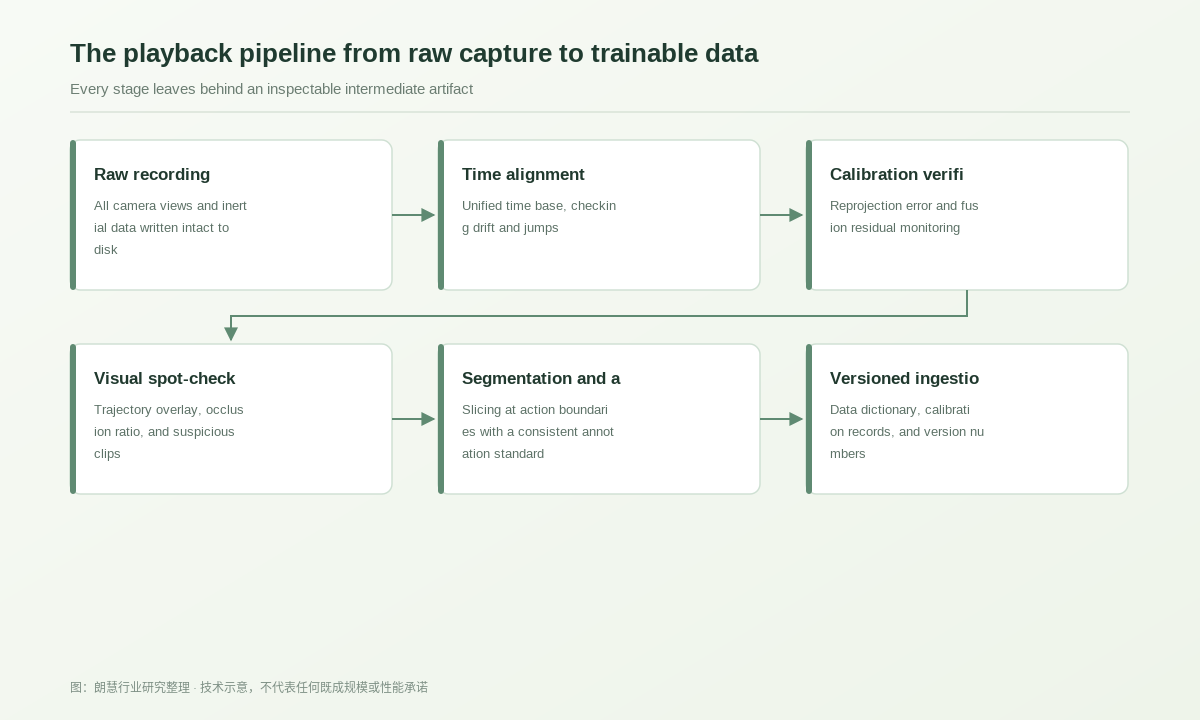
A playback tool is not a player; it is an acceptance tool. Whether a captured clip is usable is usually judged by eye on three things: whether the multiple camera views can be viewed in alignment, whether trajectories and poses can be overlaid onto the footage, and whether anomalies on the timeline can be flagged. A tool that does these three things lets one person spot-check several hundred clips a day; one that doesn't leaves you inferring from training results, which drags out the cycle for a very long time.
Visualization should actively expose problems rather than hide them. Dropped frames leave gaps on the timeline, timestamp jumps make trajectories teleport, calibration drift shows up as the footage and the trajectory slowly separating, and occlusion appears as large covered areas over the hand region. Turning these metrics into a summary panel per clip turns spot-checking into reading a panel instead of scrubbing through frames.
Sampled playback has to be combined with full-set metrics. Full-set metrics catch distributional problems—say, one device showing an exposure offset for several days straight; sampled playback catches semantic problems—say, an operator wearing gloves making fingertips invisible. Each kind of check has blind spots, and doing only one will miss things. A practical approach is to run the full-set metrics first to flag suspicious clips, then manually play back only those clips, concentrating effort where the real problems are.
You need to think through build-versus-buy on the toolchain. Secondary development on a mature visualization framework saves the engineering effort of rendering and interaction; but synchronization alignment, calibration verification, and clip segmentation are core business logic and are safer kept in-house. Version management matters just as much: after a playback tool upgrade, parsing results for older data may change, so the tool version must be recorded alongside the data version—otherwise you cannot explain the discrepancy when reproducing results.
4. Time Synchronization and Calibration: How Small Errors Can Ruin a Batch of Data
In action-prediction tasks, timing error turns directly into causal misalignment. The action happens first and the outcome appears afterward; with a gap of a few tens of milliseconds, the model may learn that 'the result comes first, the action second.' This kind of problem may not show up in training metrics at all, yet on a real robot it manifests as lagged or premature motion. Synchronization accuracy is not a mystical metric but a precondition for whether data can be used for temporal modeling.
Calibration has two layers: camera intrinsics and multi-camera extrinsics, and the extrinsics between the camera and the inertial unit or hand-mounted device. Factory calibration addresses the first layer; on-site calibration addresses the second. After a device has been repeatedly worn, knocked, and subjected to temperature changes, the extrinsics slowly drift, showing up as an overall offset or rotation of the trajectory. Doing factory calibration once and never rechecking it is why many projects see accuracy degrade mid-project.
Calibration failure can be monitored. Reprojection error is a fairly intuitive metric; running a quick check with a calibration board or a known geometric object at regular intervals, and triggering recalibration when the error exceeds the threshold, keeps things in line. The residual of inertial-visual fusion can likewise be tracked as a trend. Putting both curves on the device management panel catches problems far earlier than spot-checking after data delivery.
Every calibration result must go into the data dictionary, recording the calibration time, method, parameter version, and reviewer. It sounds tedious, but it is a prerequisite for reproducibility: when the same batch of data is processed by different teams at different times, without calibration records you cannot tell whether a difference comes from the algorithm or from the device. There is a trap here—calibration files often end up on someone's personal computer and disappear when that person leaves.
5. The Iteration Cadence from Capture to Training
There should be a short-cycle loop between capture and training rather than two long projects. A realistic cadence is: capture a batch of data covering the main scenarios, train a baseline version, see which scenario class the failures cluster in, then go back and supplement capture targeted at those. The cycle should be measured in weeks—too short and you won't get statistically meaningful samples; too long and the feedback loses its guiding value.
Data mix should follow the scenario distribution. Factory, warehouse, home, and outdoor settings each have different camera poses, lighting conditions, and occlusion patterns; training on a mixture teaches the model an averaged policy that isn't good enough in any single scenario. A workable approach is to build scenario-stratified subsets, weight them by the target scenario during training, and report results stratified during evaluation, so one overall score doesn't mask a collapse in some scenario.
Version management is the backbone of this loop. The dataset needs a version number and the model needs a version number, and the two must be matched up: which dataset version a given model was trained on, which augmentation set was used, and which version of the evaluation set. Without that correspondence, you can only guess when model performance fluctuates. Rollback is the same—when a problem is found, you need to be able to step back to the last working combination rather than starting over.
Also beware the reflex that 'more data is better.' Repeatedly capturing the same scenario yields sharply diminishing marginal returns; what actually lifts performance is long-tail scenarios and failure samples. The test is simple: look at how much of the newly captured data is something the model currently gets wrong. If the vast majority is already handled correctly, the value of that batch lies mostly in validation rather than improvement.
6. How Deployment Feedback Feeds Back into Capture Standards
Deployment-side logs are the most direct teacher for the capture side. Once the real machine is running, failure types naturally cluster: failed grasps, blocked paths, occluded targets, sudden lighting changes, non-standard operator movements. Tagging these failures by scenario, viewpoint, and action type lets you infer what was missing at the capture stage, instead of vaguely saying 'not enough data.'
Feedback has to be convertible into capture task orders. A task order should spell out at least four things: scenario, action, required viewpoints, and acceptance criteria. For example: 'Warehouse shelf level 2, one-handed box retrieval, wrist view required, box fully in frame for no fewer than N frames.' Written that way, capture personnel know how to position the devices, instead of coming back with another batch of similar data.
Whether the loop can actually turn depends on who has the authority to change the capture specification. If the specification is unilaterally drafted by the data team and the equipment team only executes it, feedback stalls at the level of complaints. A more effective arrangement is a joint review that goes through failure cases on a fixed cadence and decides on the spot whether to change the specification, the equipment, or the scenario selection. The meeting need not be long, but it must end with a conclusion and an owner.
Counterexamples are also common: when model performance is poor, the instinct is to buy more devices and hire more people, without touching the capture criteria at all. The result is that data volume goes up while the failure types stay exactly the same. To judge whether a team is genuinely iterating, look at how many times its capture specification has changed and which failure types each change addressed—that is more persuasive than looking at data scale.
7. Device Reliability: Protection, Battery Life, and Bumps
Protection ratings must match the working conditions rather than simply being as high as possible. A higher protection rating usually means tighter sealing, which makes heat dissipation harder and causes long recordings to throttle; cutting ventilation holes for cooling, in turn, sacrifices dust and water resistance. This tension is especially pronounced in head-mounted devices, where both weight and volume are constrained. At selection, write 'how many continuous working hours, what ambient temperature, is there dust' into the requirements, then have the supplier propose a solution.
Battery management should be designed around shifts, not around a single recording. A work shift often outlasts a single battery, and swapping batteries mid-shift means a break in the data. A workable approach is to support hot-swapping or rotating between two batteries, and to guarantee in firmware that files before and after a swap can be stitched together with continuous timestamps. The battery-swap procedure has to go into the field work card, otherwise operators will simply power down for convenience and the data will be cut.
Structural reliability is often underestimated. A head-mounted bracket takes considerable torque when the wearer bends over, looks up, or squeezes into a narrow space; cabling is usually the first component to fail, and lens protectors easily pick up scratches after impacts, showing up as localized blur in the footage. The spares strategy should be built around wear items: the spare ratio for cables, brackets, and protectors should exceed that of the main unit, and repair turnaround times should be agreed up front.
Firmware upgrades need a rollback path. A new firmware version may fix a synchronization issue yet introduce heat or power problems, so if a batch anomaly appears in the field you need to be able to quickly revert to the previous version. The recommended upgrade strategy is phased rollout: run a full complete shift on a small batch of devices first, then push to the whole fleet. Do not ship a major version upgrade one week before a delivery milestone—many projects have tripped over this.
8. Field Implementation: Permits, Occlusion, and Personnel Coordination
The first thing field implementation requires is not installing equipment but obtaining permits. Factories involve work-safety management, roof work involves high-altitude work qualifications, and medical or public-service settings involve filming authorization and privacy notices. Entering the site before permits are granted gets you, at best, asked to leave and, at worst, the entire batch of data invalidated. Building the permit timeline into the schedule is the project manager's job.
Wearability directly determines data quality. A heavy device that clamps the head and runs hot will make operators subconsciously shorten their wearing time or adjust it frequently, increasing camera shake and occlusion. A pragmatic approach is to run a small trial wear first, collect subjective feedback, then settle on the mount design; the trial should cover different head shapes and combinations of protective gear, not just one person.
Occlusion and lighting are the two big variables in the field. Backlighting turns hands into silhouettes, dust lays a gray haze over the footage, and safety glasses and gloves change fingertip visibility. None of this can be fixed in post—only adjusted on site: add shading, change the camera position, reorder the workflow, or note in the task order that 'operations requiring the removal of safety glasses will be scheduled separately.'
The field record sheet looks like administrative work but is actually the basis for troubleshooting. Device ID, operator, task type, start and end times, and a description of the anomaly—fill in all of these columns and, during playback, you can tie an anomaly back to the specific conditions. The record sheet should be integrated with the device management panel, with scan-to-entry to reduce the bias introduced by filling things in afterward.
9. Cross-Border Delivery: Device Certification and Data Boundaries
Cross-border device shipment must first clear certification. Different markets have their own requirements for the electromagnetic compatibility, safety, and wireless emission of electronic products; the common practice is to run compliance testing for the target market in advance and obtain the corresponding marks, while also confirming the customs commodity code to avoid detention during logistics. Certification cycles are usually measured in weeks and longer if there is a queue, so build slack into the schedule.
The boundary for cross-border data is more complex than for devices. A fairly safe path is to complete de-identification and structuring domestically and export only processed results containing no direct identifiers; alternatively, keep the processing step inside the region where the data resides and export only models and statistical results. Which route to take depends on the data type, purpose, and the jurisdiction of the recipient, and requires case-by-case judgment by legal and compliance teams rather than a template.
Where compute sits is part of the same question. Keeping training in the region where the data resides reduces the movement of raw data; putting training offshore requires completing de-identification first and retaining processing logs. The two options trade off differently on cost, latency, and auditability, and the choice depends on the project's requirements for iteration speed.
Compliance should not be patched in at the end. The common scenario is that devices have already shipped and data has already been captured, and only then does a problem with certification or the outbound pathway surface, sinking all the earlier investment. Mapping out the certification checklist and the data flow diagram at project initiation is far cheaper than remediation after the fact.
10. Cost Structure: Equipment, Labor, and Rework
The biggest cost driver in embodied data projects is usually not hardware but labor and rework. Equipment is a one-time investment, while labor and rework grow linearly with project scale. When a batch of data becomes unusable overall because of calibration drift, what is lost is not only capture hours but also the scenario owner's cooperation window—many sites give you only one chance.
Rework sources are fairly concentrated: calibration failure, prolonged occlusion, dropped frames from a full storage card, scrambled timestamps, and scenarios that don't match the task order. All of these can be reduced through front-loaded checks—say, running a calibration check before recording, monitoring card write speed during capture, and spot-checking ten minutes of playback before wrapping up. The cost is low, and it blocks most whole-batch rework.
Automation is the main lever for lowering unit cost. On-device frame extraction, automatic exposure, anomalous-frame tagging, and batch playback summaries are all things you build once and reuse. Conversely, if every batch of data has to be reviewed clip by clip by hand, scale will turn labor into the bottleneck—and the judgment criteria of different reviewers will drift apart.
Procurement decisions should be made on total cost of ownership. Cheap devices may save on the hardware line item but bring higher repair rates, more frequent replacement, and more manual review. Adding equipment, spares, repairs, labor, and rework together often leads to a different conclusion than looking at the purchase order alone.
11. Forward-Looking Assessments for the Next 12 to 24 Months
Device form factors will continue to diverge. Head-mounted multi-camera systems will evolve toward wider fields of view and better distortion control, wrist and hand views will become a standard supplement, and full-body motion capture will move from demonstrations toward production engineering. Eye-level, low-distortion footage will shift from a differentiator to a default requirement, and the room left for fisheye solutions in training-data scenarios will narrow further.
Changes on the data side are more worth watching. Playback and quality-control tooling will standardize, and data dictionaries, calibration records, and version logs will go from 'nice to haves' to required deliverables. Buyers will start demanding reproducibility: given a clip of data, can you recompute the same result on a different device? Once that requirement becomes universal, teams propped up by manual experience will be pushed out.
On the scenario side, demand for real work data in factories and services will keep rising, while growth in home settings will depend on how quickly robot hardware costs fall. The first to benefit will be teams that have both on-site resources and the ability to codify their capture process; teams that only run one-off projects and don't build reusable tooling will be held back at scale.
For those preparing to enter the field, what is worth investing in over the next two years is not more devices but three things: a device management process that monitors synchronization and calibration, a playback tool that can quickly filter out suspicious clips, and a data dictionary that can be shared across teams. None of these will go out of date when the model generation changes.
Langhui's Engineering Capabilities Along This Path
Langhui Technology has produced AI training data since 2016, handling capture-specification design, structured annotation, quality control, and consistency reporting in the embodied and multimodal domains, and delivering data dictionaries, calibration records, and version logs. Its medical experience covers CT, MR, PET, mammography, ultrasound, and other modalities; this same process-oriented management approach also applies to batch segmentation and spot-checking of motion data.
We neither manufacture nor sell capture hardware, and we do not claim to hold hardware certification qualifications. What we can do is turn device output into trainable, playable, and recomputable data assets: defining fields and clip boundaries, designing spot-check sampling rates and defect grading, and producing traceable quality-control records. Matters involving cross-border data transfer, privacy compliance, and legal opinions are issued by qualified institutions.
If your team is building an embodied data pipeline, or needs to codify an existing capture process into a reusable specification, send us the scenario types, device form factors, and delivery milestones, and we will provide an actionable capture-specification framework and acceptance checklist. Build the specification once, and subsequent batches can reuse it directly.
FAQ
Does head-mounted capture equipment have to be multi-camera?
Not necessarily—it depends on the task. For coarse-grained action recognition only, a single camera plus an inertial unit may be enough; for fine hand manipulation or spatial positioning, multiple cameras provide parallax and more complete occlusion compensation. A more practical approach is to first define which viewpoints are needed and where the heavily occluded regions are, then decide the number of cameras and their layout, rather than assuming more cameras is always better.
Do we need to build our own playback tool for captured data?
You can build on a mature visualization framework for secondary development, so rendering and interaction do not have to be written from scratch. But logic such as time alignment, calibration verification, and clip segmentation is core business logic and is best kept in your own hands. Tool versions should be recorded together with data versions; otherwise, after a tool upgrade, parsing results for older data change and it becomes difficult to explain the source of differences when reproducing results.
How good does time synchronization need to be?
It depends on the task's sensitivity to timing. Tasks like action prediction and force-feedback alignment demand high synchronization; errors directly become causal misalignment. Coarse-grained tasks that only do scene understanding can be more relaxed. In practice, it is advisable to first measure the drift curve over a long recording, then set thresholds, and write synchronization accuracy into the acceptance checklist rather than merely noting 'supports synchronization' in the purchase parameters.
Is buying equipment rated IP65 enough for protection?
It depends on the working conditions. A high protection rating usually means tighter sealing and harder heat dissipation, so long continuous recordings may throttle; roof, dust, and rainy scenarios have high protection requirements, while indoor assembly scenarios should focus more on heat dissipation and weight. A safer approach is to write continuous working hours, ambient temperature, and dust conditions into the requirements, so the solution makes an explicit trade-off between protection and cooling.
Can you just start capturing data as soon as you buy the equipment?
Usually not. You also need on-site calibration, mount fitting, firmware parameter configuration, workflow procedures, and record sheets; missing any one of them affects data usability. It is recommended to run a small trial wear and trial capture first, working the full pipeline from recording through playback spot-checking before scaling up. Skipping the trial capture and going straight to large-scale capture is a common cause of whole-batch rework.
- Open X-Embodiment Collaboration, Open X-Embodiment: Robotic Learning Datasets and RT-X Models https://arxiv.org/abs/2310.08864
- Brohan et al., RT-2: Vision-Language-Action Models Transfer Web Knowledge to Robotic Control https://arxiv.org/abs/2307.15818
- DROID: A Large-Scale In-The-Wild Robot Manipulation Dataset https://arxiv.org/abs/2403.12945
- Grauman et al., Ego4D: Around the World in 3,000 Hours of Egocentric Video https://arxiv.org/abs/2110.07058
- IEC 60529, Degrees of protection provided by enclosures (IP Code) https://webstore.iec.ch/publication/2452